Pasting Recipes from word processing files
If you have your recipes in a Microsoft Word, Google Docs, or other word processing file, you can easily paste them into Recipe Tamer. Here's how:
- Open the recipe file in your word processing software.
- Create a new recipe in Recipe Tamer: click the Recipes button at the top of the page and then choose Create a Recipe.This will take you to the Recipe Editor.
- Copy and paste text from your document into your recipe.
If you're in a hurry you can simply paste all the text into a single box in Recipe Tamer (use the Headnote or Notes box). However, for best results take a moment to paste the parts of the recipe into the appropriate boxes.
Ingredients
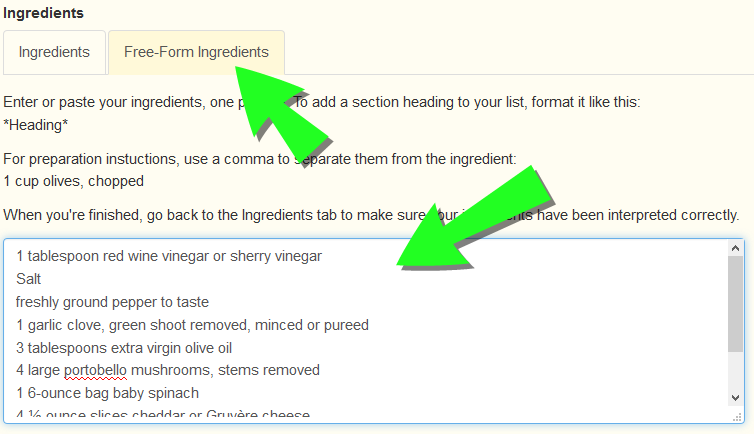
Putting the recipe ingredients into the designated area lets you take advantage of features like recipe scaling, shopping list generation, and nutrition analysis. To do this, click the Free-Form Ingredients tab in the Ingredients section, then paste your ingredients list in the box:
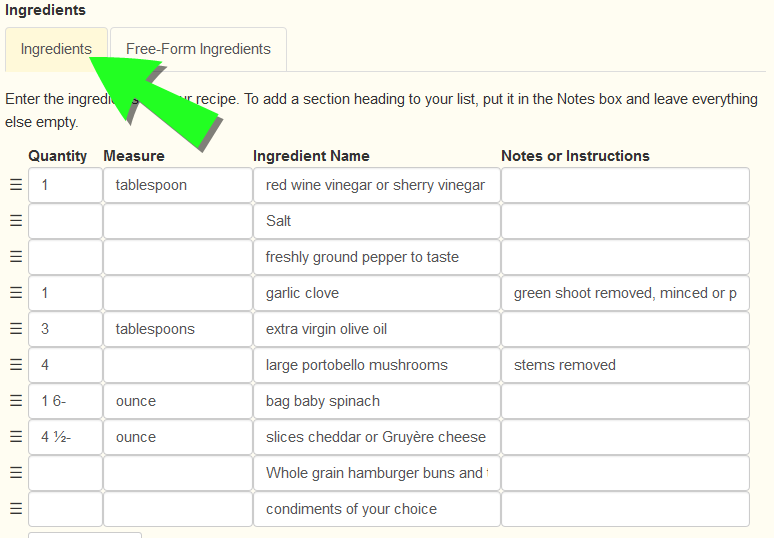
Then click the Ingredients tab. Recipe Tamer will read your ingredients and convert them to a list format. Make any necessary adjustments to the way Recipe Tamer has interpreted the ingredients:
Instructions
Formatting your instructions as a numbered list lets Recipe Tamer to display step-by-step instructions or highlight steps for you. To get your steps formatted correctly, paste them into the Instructions box. If you were using automatic numbering in your original document, this formatting should carry over to Recipe Tamer. Otherwise you can easily convert to automatic numbering:
- Remove any step numbers that were typed in directly.
- Highlight all the text in the instructions box.
- Click the ordered list button (
 ) on the toolbar.
 - Automatic numbering will be applied to the paragraphs of text. You may need to combine or separate steps to get the desired results.
